Duplicate control In every plan
World-class duplicate control. Monitoring that never stops.
The same client typed in twice, imported again, or written as “Mr. Bauer” in one place and “Daniel Bauer” in another splits their jobs, invoices and notes across copies. DMO CRM finds those copies, tells you how sure it is, merges them safely, and then keeps watching so new ones never pile up again.
14-day free trial, no card needed. Every screen on this page is the real DMO CRM with made-up sample data.
See it work
From a messy client list to one record per client
A made-up accounting office, Harbor & Pine Accounting, has just imported its old client list. Every step is a real screen.
Duplicate control
1Find
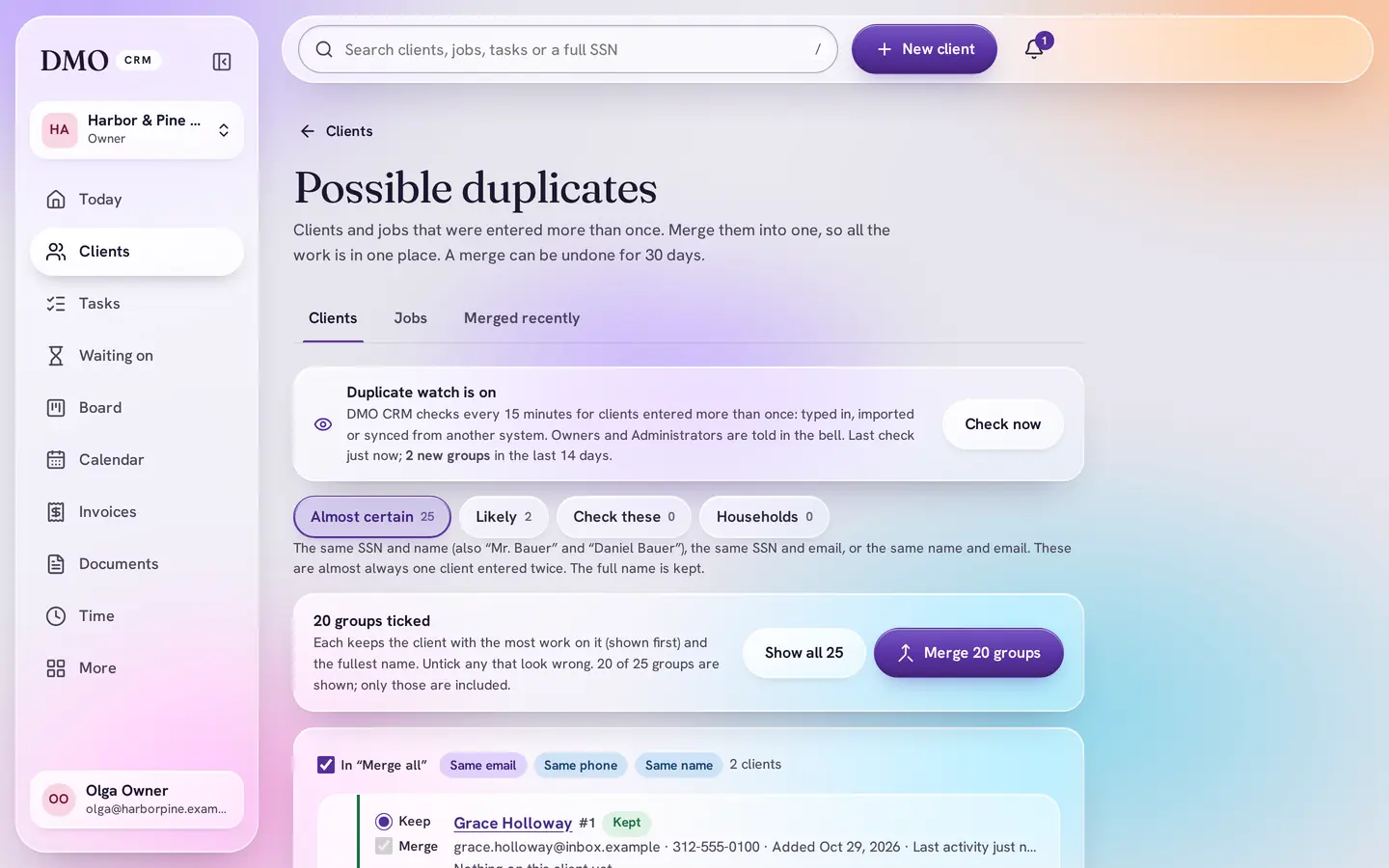
Every possible duplicate, sorted by how sure
Clients, then Possible duplicates. Each group says what the copies share (email, phone, name or tax ID number) and how sure DMO CRM is: Almost certain, Likely or Check these.
2New
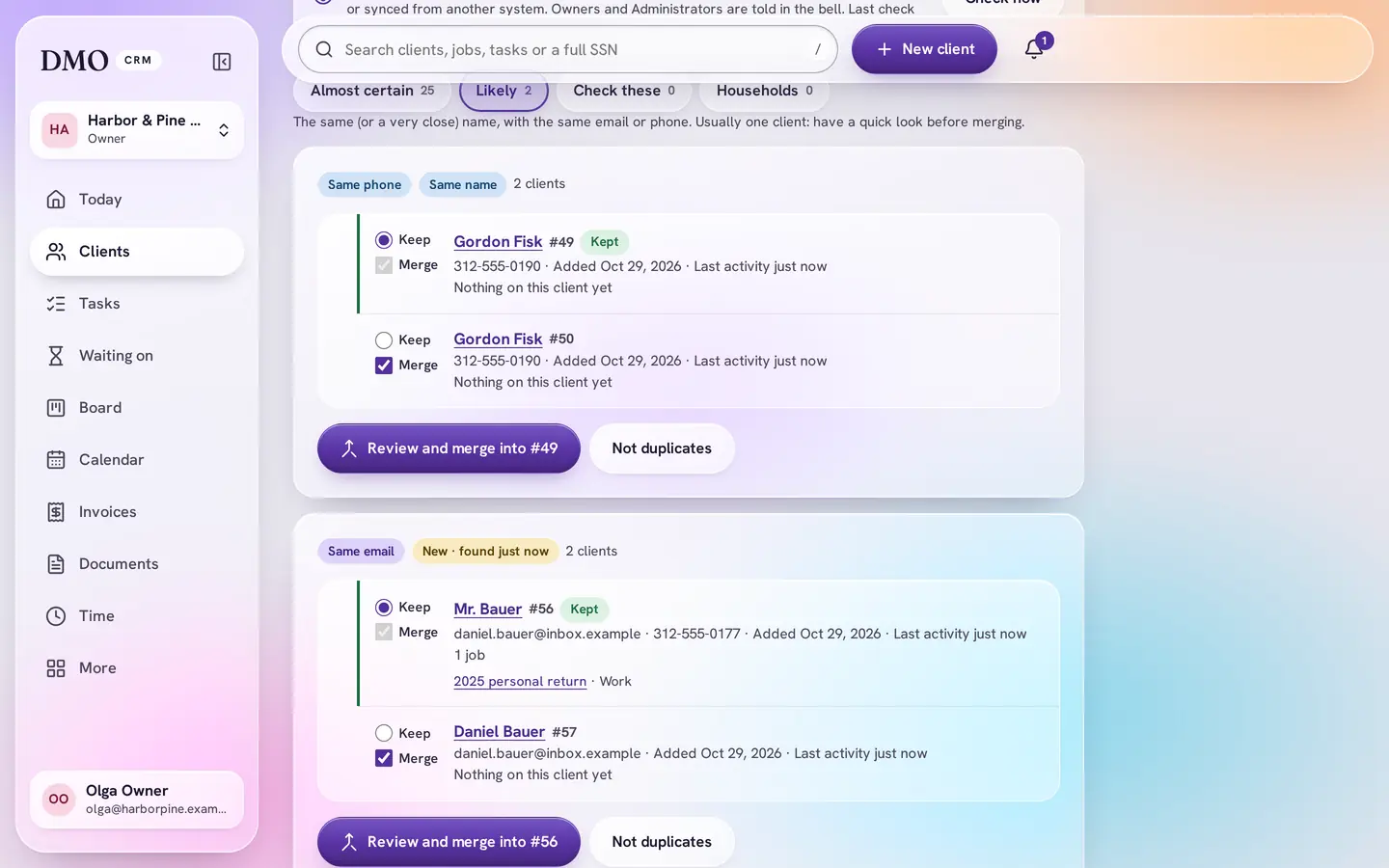
New copies are marked new
A copy that arrived since the last look is marked New, with when it was found. Here an import added “Mr. Bauer” with the same email as Daniel Bauer: a title and surname that match a full name, with the same email, is likely.
3Review
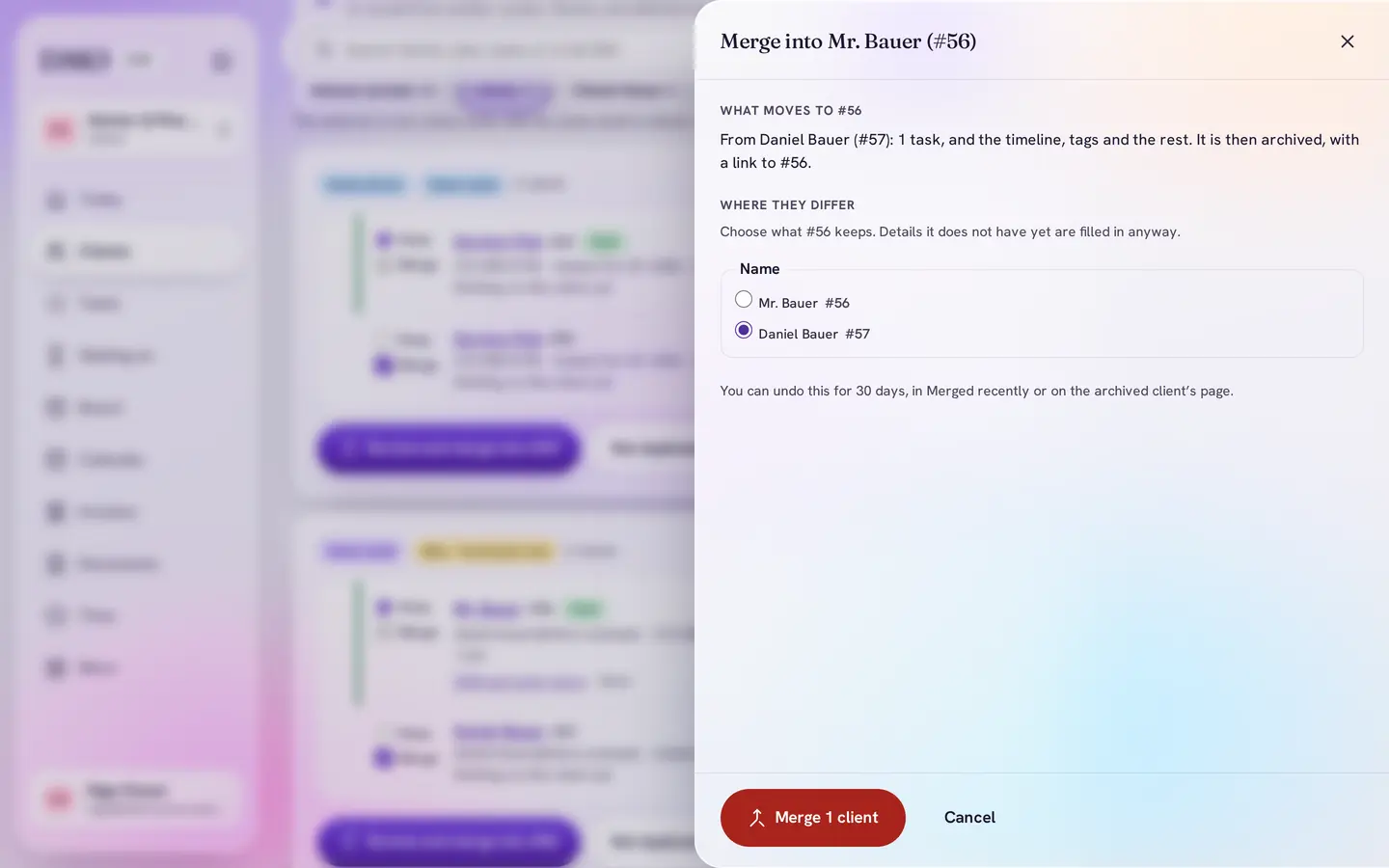
See what moves before anything changes
The review lists everything that moves to the client you keep, such as jobs, tasks and invoices. The full name is suggested over a title, so you keep Daniel Bauer, not “Mr. Bauer”.
4Monitor
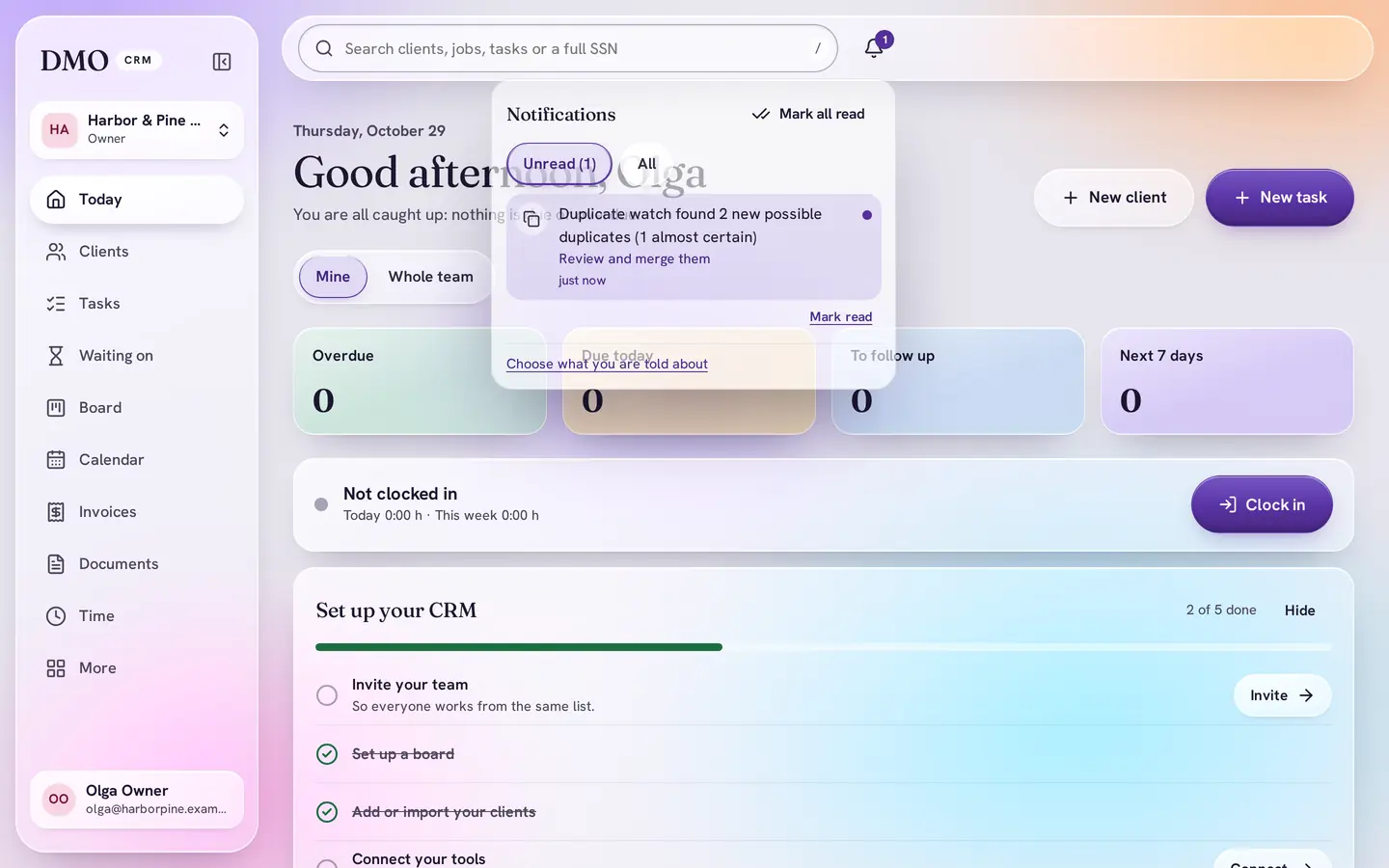
Told the moment new copies appear
The duplicate watch checks every 15 minutes, including after imports and syncs from other systems. When it finds new copies, Owners and Administrators get one notice in the bell, with how many are almost certain.
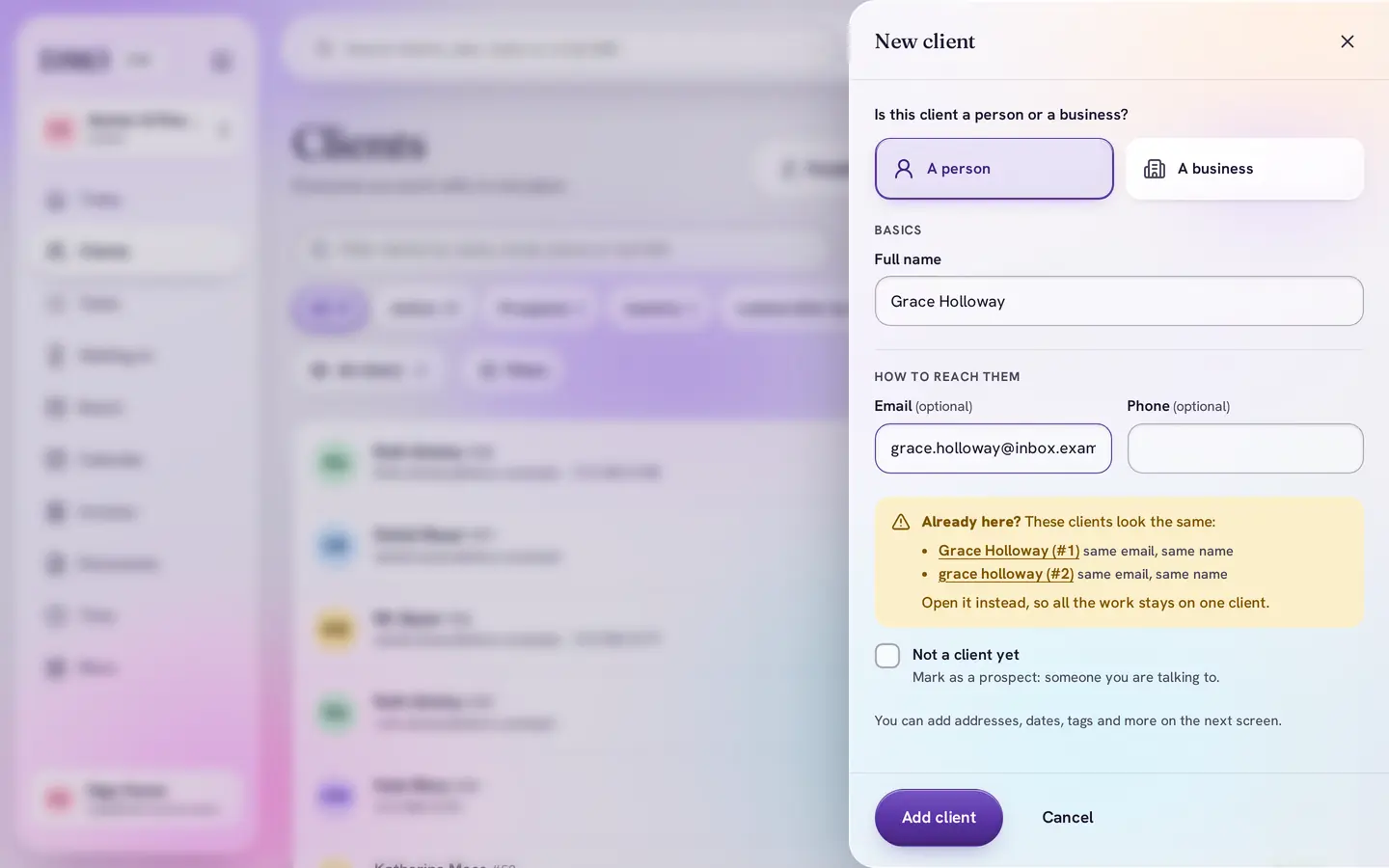
5Prevent
“Already here?” while you type
Adding a client whose email, phone or name is already in DMO CRM shows Already here? with a link to the existing record, so the copy is never made.


How it decides
It tells you how sure it is
Not every match is a duplicate. DMO CRM looks at email, phone, name and private ID numbers together, and puts every group in one of four levels, so you can merge the sure ones quickly and look closely at the rest.
Almost certain
The same name and the same email; a name written a little differently with the same email and phone; or the same SIN or SSN with the same email or a matching name. Merge these 20 at a time.
Likely
A matching name with one thing in common, like a phone number, or “Mr. Bauer” and “Daniel Bauer” with the same email. Worth a quick look before merging.
Check these
The same name and nothing else, or the same SIN or SSN under names that do not match. You decide.
Households
Different people who share a phone or email, like a couple, or a person and their own company. Shown apart and never offered for merging in bulk.
Rules that think like your office
- Spelling, spacing and order do not hide a copy: “Grace Holloway”, “grace holloway” and “Holloway, Grace” are one person
- Gmail addresses match with or without dots and “+tags”, as Gmail delivers them
- Placeholder addresses like noemail@… or none@… are ignored, so they never tie strangers together
- Nicknames are understood: Bob and Robert, Kate and Katherine, Tom and Thomas
- The full name wins: “Mr. Bauer” and “Daniel Bauer” become Daniel Bauer, also when you merge many at once
- A company is never merged with a person, even when they share a tax ID number
- Two different SINs or SSNs are two different people, whatever else they share
Monitoring
Clean once, and it stays clean
Cleaning up duplicates once is not enough: new copies arrive with every import, every sync and every busy day at the front desk. The duplicate watch keeps looking for you.
Duplicate watch
- Checks every 15 minutes, all day, whether clients were typed in, imported or synced from another system
- Only Owners and Administrators are told, with one notice at a time, never a flood
- New groups are marked New with when they were found, and the Clients page shows how many are waiting
- “Check now” looks at once, for example right after an import
- Turn the notices off in your notification settings if you prefer to look yourself
Safe merging
- Merge one group, the first 20, or all of the almost certain ones after you have looked through them
- Untick any group you are not sure about before merging the rest
- Undo any merge for 30 days, from the merged client’s page or Merged recently
- Only Owners and Administrators can merge; everyone else still sees the “Already here?” hint
- Not duplicates? Dismiss the group and it stays away
- Duplicate jobs on the same client are found and merged the same way
Plans
In every plan, from Essentials
Duplicate control and the duplicate watch are part of DMO CRM itself, not an add-on. Essentials is $15 a user a month, and every plan starts with a 14-day free trial.
Questions
Which plans include duplicate control?
Every plan, from Essentials up. Finding duplicates, merging, undo and the duplicate watch are not a paid add-on.
Can a merge be undone?
Yes, for 30 days. The merged client’s page says where it went and has an Undo button, and every merge is listed under Merged recently on the duplicates page.
Does DMO CRM ever merge clients by itself?
No. The duplicate watch finds copies and tells you; a person always decides what is merged. Merge all only covers the groups that are almost certain and still ticked.
What happens to the jobs, invoices and notes of a merged copy?
They move to the client you keep. The review shows exactly what moves before you confirm.
We share a phone number with family members. Will they be merged?
No. People with different names who share a phone or email are shown as a household, apart from the real duplicates.
Does it help after moving from another CRM?
Yes, that is when most copies appear. Import your clients, press Check now, and merge the almost certain ones 20 at a time.
One client, one record. Every time.
Bring your client list from anywhere. DMO CRM finds the copies, merges them with you, and keeps watching from then on.
14-day free trial, no card needed.